mirror of
https://github.com/bootandy/dust.git
synced 2026-06-08 11:29:05 +03:00
[GH-ISSUE #506] [feat request]: command to open an interactive file manager and dust #225
Assignees
 zhus (Sergey Zhukov)
Clear assignees
zhus (Sergey Zhukov)
No Assignees
Notifications
Due Date
No due date set.
Dependencies
No dependencies set.
Reference: bootandy/archived-dust#225
Reference in New Issue
Block a user
Delete Branch "%!s()"
Deleting a branch is permanent. Although the deleted branch may continue to exist for a short time before it actually gets removed, it CANNOT be undone in most cases. Continue?
Originally created by @juanMarinero on GitHub (Jul 1, 2025).
Original GitHub issue: https://github.com/bootandy/dust/issues/506
dust is awesome, but not dynamic like a file manager. One can take advantage of both if:
Next is my proposal, though it just works using kitty and
zsh.Request:
@bootandy commented on GitHub (Jul 2, 2025):
This has come up before, I was thinking about how best to add this.
@juanMarinero commented on GitHub (Jul 3, 2025):
Thanks for answering!
Sorry if duplicated issue, I searched
file manageron any issue (including closed) and I found nothing alike: link.Maybe this can be:
And there just link to this issue, so anyone can further expand (adding comments or repo links) with new solutions. Because iterate all requires a lot of effort, it's a 3 dimensional issue:
ncdu, NNN, broot,...Well, actually the file-manager command it's easy to customize for each user needs, but that's still a O(n^2) (Shells × Terminals) job!
Once there are several solutions (for various Shells × Terminals) then one could try to unify all them under a script (create a PR). But if this task gets too big/dirty then there is no need to accomplish it, just let the user copy what needed. This is just my humble opinion how to approach it. If you agree then this issue should be kept open for a while.
@bootandy commented on GitHub (Jul 5, 2025):
https://github.com/bootandy/dust/issues/159
I'm thinking about implementing this currently
@juanMarinero commented on GitHub (Jul 5, 2025):
Also, I would not try to add an interactive mode like NCDU has as you comment in #159 (btw thanks to point me to the original issue I could not find). I think:
Actually dust remember me a lot to br --whale-spotting
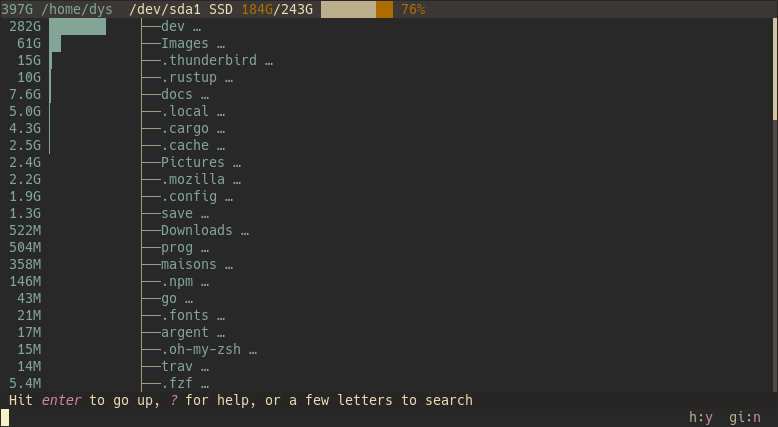
...which sadly does not allow to show tree depth in this mode, i.e. --max-depth flag is not compatible with whale mode. In contrast the normal tree mode does yes show several depths [and the sizes].
So my proposal is, to apply your experience to further develop broot enabling depths in whale mode, alike dust already does [but it does it not interactive].
But who am I to judge? No one hehe. You have coded dust, and I have not coded it nor broot. So maybe making dust interactive it's not so hard as I think, and people will not asks for terminal-file-managers features once you accomplish it.
@bootandy commented on GitHub (Jul 5, 2025):
dust does one thing very well: tree show where my disk is being used
Yes that was exactly my thinking originally.
However, when I have the time I'd like to see if I can fit an interactive mode in there, ( I don't know if its possible or sensible - but I'm curious to try).
@bootandy commented on GitHub (Jul 5, 2025):
For your integration script and any future extensions - I think you should host that in a separate repo, and I'm happy to add a link in the README of dust.
@nickjj commented on GitHub (May 1, 2026):
I usually agree with the idea of doing one thing very well but sometimes you have to factor in a full view of what folks are using your tool for.
For example, someone might have a use case of "I want to see what's taking up a lot of disk space", maybe they are just curious and that's completely reasonable, but it's also likely they want to take action to delete the big files or directories.
This is where having both the current behavior and an opt-in optional interactive mode could be handy. It solves the end game problem of "show me big files and let me clean them" in a unified way.
This comes with a pretty big responsibility though, if you introduced interactive mode with a hotkey to delete selected items, this adds code to the code base that really deletes files on disk in a permanent way.
The current behavior isn't too bad in a lot of cases though, you just end up manually
rm'ing these files separately. If you have a small handful of files this isn't too bad.