[](https://travis-ci.org/bootandy/dust)
# Dust
du + rust = dust. Like du but more intuitive.
# Why
Because I want an easy way to see where my disk is being used.
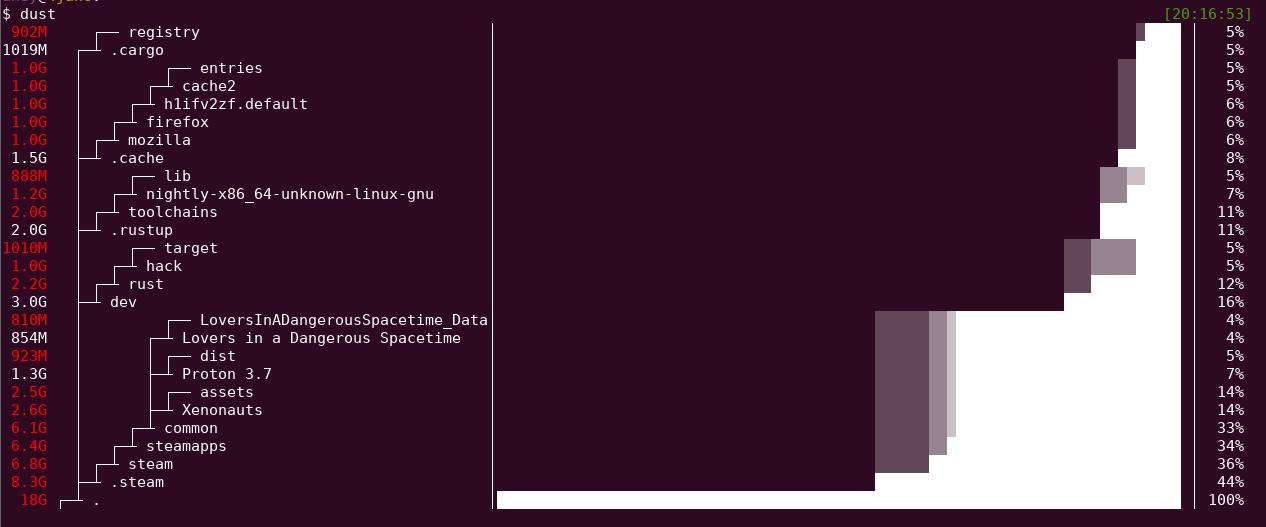
# Demo
## Install
#### Cargo  * `cargo install du-dust`
#### 🍺 Homebrew (Mac OS)
* `brew install dust`
#### 🍺 Homebrew (Linux)
* `brew tap tgotwig/linux-dust && brew install dust`
#### Download
* Download Linux/Mac binary from [Releases](https://github.com/bootandy/dust/releases)
* unzip file: `tar -xvf _downloaded_file.tar.gz`
* move file to executable path: `sudo mv dust /usr/local/bin/`
## Overview
Dust is meant to give you an instant overview of which directories are using disk space without requiring sort or head. Dust will print a maximum of one 'Did not have permissions message'.
Dust will list a slightly-less-than-the-terminal-height number of the biggest subdirectories or files and will smartly recurse down the tree to find the larger ones. There is no need for a '-d' flag or a '-h' flag. The largest subdirectories will be colored.
## Usage
```
Usage: dust
Usage: dust
Usage: dust
Usage: dust -p (full-path - does not shorten the path of the subdirectories)
Usage: dust -s (apparent-size - shows the length of the file as opposed to the amount of disk space it uses)
Usage: dust -n 30 (shows 30 directories instead of the default)
Usage: dust -d 3 (shows 3 levels of subdirectories)
Usage: dust -r (reverse order of output, with root at the lowest)
Usage: dust -x (only show directories on the same filesystem)
Usage: dust -X ignore (ignore all files and directories with the name 'ignore')
Usage: dust -b (do not show percentages or draw ASCII bars)
```
## Alternatives
* [NCDU](https://dev.yorhel.nl/ncdu)
* [dutree](https://github.com/nachoparker/dutree)
* du -d 1 -h | sort -h
Note: Apparent-size is calculated slightly differently in dust to gdu. In dust each hard link is counted as using file_length space. In gdu only the first entry is counted.
* `cargo install du-dust`
#### 🍺 Homebrew (Mac OS)
* `brew install dust`
#### 🍺 Homebrew (Linux)
* `brew tap tgotwig/linux-dust && brew install dust`
#### Download
* Download Linux/Mac binary from [Releases](https://github.com/bootandy/dust/releases)
* unzip file: `tar -xvf _downloaded_file.tar.gz`
* move file to executable path: `sudo mv dust /usr/local/bin/`
## Overview
Dust is meant to give you an instant overview of which directories are using disk space without requiring sort or head. Dust will print a maximum of one 'Did not have permissions message'.
Dust will list a slightly-less-than-the-terminal-height number of the biggest subdirectories or files and will smartly recurse down the tree to find the larger ones. There is no need for a '-d' flag or a '-h' flag. The largest subdirectories will be colored.
## Usage
```
Usage: dust
Usage: dust
Usage: dust
Usage: dust -p (full-path - does not shorten the path of the subdirectories)
Usage: dust -s (apparent-size - shows the length of the file as opposed to the amount of disk space it uses)
Usage: dust -n 30 (shows 30 directories instead of the default)
Usage: dust -d 3 (shows 3 levels of subdirectories)
Usage: dust -r (reverse order of output, with root at the lowest)
Usage: dust -x (only show directories on the same filesystem)
Usage: dust -X ignore (ignore all files and directories with the name 'ignore')
Usage: dust -b (do not show percentages or draw ASCII bars)
```
## Alternatives
* [NCDU](https://dev.yorhel.nl/ncdu)
* [dutree](https://github.com/nachoparker/dutree)
* du -d 1 -h | sort -h
Note: Apparent-size is calculated slightly differently in dust to gdu. In dust each hard link is counted as using file_length space. In gdu only the first entry is counted.